Categories
Laravel 9

Route Model Binding – Laravel 9

Route Model Binding in Laravel 9?

Route model binding in Laravel provides a mechanism to inject a model instance into your routes. Still not clear on the meaning, here is an example. Say we want to get a post from the database, we could do something like this:

...
// the route parameter is the id of the post
// for example http://example.com/posts/53
Route::get('posts/{id}', function ($id) {

  // we have to find the post using the $id
  $post = Post::find($id);

  // if there is no post, 404
  if (!$post) return abort(404);

  // return the view and the post
  return view('post.show', compact('post'));
});
...

We could further go on to simplify this method into

...
// the route parameter is the id of the post
// for example http://awesome.dev/posts/53
Route::get('posts/{id}', function ($id) {

  // find the post or 404 if not found
  $post = Post::findOrFail($id);

  // return the view and the post
  return view('post.show', compact('post'));
});
...

But route model binding helps us get rid of extra keystrokes by simplifying both instances above into

...
// by using $post, we can inject the Post object
Route::get('posts/{post}', function ($post) {

  // we now have access to the $post object! no code necessary

  // return the view and the post
  return view('post.show', compact('post'));
});
...

This is made possible by telling Laravel to inject a Post model into any route controller that has a {post} parameter attached to it.

Laravel currently supports two types of route model bindings. We have:

  • Implicit model binding
  • explicit model binding

Implicit Route Model Binding

While we’ve seen explicit model binding, here’s an example of implicit model binding now:

Route::get('posts/{post}', function (App\Post $post) {
  // be awesome. enjoy having the $post object
});

Laravel is smart enough to know that since a Post model is being injected into the controller closure, it should get the id parameter from the route and get the details for the user.

Accessing a post will still be done using http://awesome.example.com/posts/24.

Changing the Model’s Route Key

If you would like the implicit model binding to use a database column other than id when retrieving models, you may override the getRouteKeyName method on your Eloquent model.

For instance, if we wanted to use the slug instead of the id, we could do the following:

class Post extends Model {
  public function getRouteKeyName() {
    return 'slug';
  }
}

Then we could access our route using http://awesome.example.com/posts/my-post-slug instead of http://awesome.example.com/posts/24.

Explicit Route Model Binding

Just like the name implies, you have to explicitly tell Laravel you want it to bind a url parameter to a particular model. There are two ways to do this, we could bind a parameter to a model using the provided Route facade or carry out this binding in app/Providers/RouteServiceProvider.php (I prefer this method).

Using the Route Facade

Using the Route facade to bind a parameter to a model, we can do something like this:

Route::bind('post', 'App\Post');

We could also give our binding more meaning, for example, what if we want a post only if is a draft? For that, we could change the second parameter of the Route::bind to a closure which takes the route parameter as its value.

Route::bind('post', function ($value) {
  return App\Post::find($value)->where('status', '=', 'published')->first();
});
Using the RouteServiceProvider

The only difference between using the Route facade and RouteServiceProvider class is that – registering your bindings is done in the boot method of the RouteServiceProvider class (location is app/Providers directory) and the bind method is called on the $router object injected into the method. Quick example

public function boot(Router $router)
{
  parent::boot($router);

  $router->bind('post', function ($value) {
    return App\Post::find($value)->where('status', '=', 'published')->first();
  });
}

Custom Exceptions for Route Model Binding

I build a lot of APIs, so custom exceptions for route model bindings are actually more useful for people like me. Laravel provides an easy way for us to do this. Still in the boot method of the RouteServiceProvider class, call the model method on the $router object.

The model method takes three arguments, the arguments are similar to that of the bind method, with a new addition the third argument which is a closure that throws the new exception.

$router->model($routeParameter, $modelToBind, function () {
  throw new NotFoundHTTPException;
});


Categories
Laravel 9

Global Middleware

Concept of Global Middleware in Laravel

Concept of Global Middleware. Middleware are just like the filter funnel which filters the HTTP request inside any application. Any request before enter into application must needs to pass through the barrier of middleware which application contains.

Middlewares are basically used to filter the authenticated request in application. By the help of which we can detect which route is valid or invalid. Apart from this, we have several other examples.

In Laravel we have three types of middlewares –

Inside this article, we will see the concept of Global Middleware in Laravel.

Global Middleware?

Global middleware name itself clears that, the middleware which will be applied globally to entire application. All the request inside application must be needs to go with filter funnel i.e middleware and then process next.

By the help of php artisan command, we create Middleware in laravel.

 php artisan make:middleware <MiddlewareName>

Middlewares will be stored inside /app/Http/Middleware. To register middleware inside application, Kernel.php file will be used which is inside /app/Http. Kernel.php, it’s a class file which contains registration of middlewares.

Example – Global Middleware Implementation

Let’s take an example to understand the concept of global middleware inside laravel application.

  • Create a Middleware which checks country, when we open URL.
  • US, IN, AFG should be allowed inside application, they can access application routes.
  • UK, AUS should be restricted to use or access route.

Create a Middleware

Open project into terminal and run this artisan command.

php artisan make:middleware CountryCheck

It will create a file with name CountryCheck.php at /app/Http/Middleware folder.

Open CountryCheck.php file and write this following code into it.

<?php

namespace App\Http\Middleware;

use Closure;
use Illuminate\Http\Request;

class CountryCheck
{
    /**
     * Handle an incoming request.
     *
     * @param  \Illuminate\Http\Request  $request
     * @param  \Closure  $next
     * @return mixed
     */
    public function handle(Request $request, Closure $next)
    {
        if ($request->country && !in_array($request->country, array("us", "in", "afg"))) {
            return redirect("noaccess");
        }
        return $next($request);
    }
}

$request->country is NOT (US, IN, AFG), it will open no access page.

Register Middleware in Application

Open Kernel.php from /app/Http. Search for $middleware and add this.

protected $middleware = [
  ...

  \App\Http\Middleware\CountryCheck::class,

  ...
];

Create NoAccess Route

Open web.php from /routes and write this route into it.

Route::view("noaccess", "noaccess");

Next, we need to create noaccess.blade.php file.

Create NoAccess Page

Create a file called noaccess.blade.php at /resources/views folder. Open write this simple code into it.

<h3>Sorry! You have no access to open this page.</h3>

Application Testing

Open project to terminal and type the command to start development server.

php artisan serve

URL – http://127.0.0.1:8000/?country=us

We can access the routes.

URL – http://127.0.0.1:8000/?country=uk

Output:

Sorry! You have no access to open this page.

We hope this article helped you to learn about Concept of Global Middleware Tutorial in a very detailed way.

Categories
Laravel 9

Group Middleware

Concept of Group Middleware. Middleware are just like the filter funnel which filters the HTTP request inside any application. Any request before enter into application must needs to pass through the barrier of middleware which application contains.

Middlewares basically used to filter the authenticated request in application. By the help of which we can detect which route is valid or invalid. Apart from this, we have several other examples.

In Laravel we have three types of middlewares –

Inside this article, we will see the concept of Group Middleware in Laravel 9.

Group Middleware?

Group middleware name itself clears that, the middleware which will be applied to a group of routes in application. All the group routes where we apply the concept of Group middleware inside application must be needs to go with filter funnel i.e middleware and then process next.

By the help of php artisan command, we create Middleware in laravel.

php artisan make:middleware <MiddlewareName>

Middlewares will be stored inside /app/Http/Middleware. To register middleware inside application, Kernel.php file will be used which is inside /app/Http. Kernel.php, it’s a class file which contains registration of middlewares.

Example – Group Middleware Implementation

Let’s take an example to understand the concept of group middleware inside Laravel application.

  • Create a Middleware which checks country, when we open URL.
  • Example We will have 3 routes in which two routes should be protected by middleware and third one is open to access for everyone.
  • US, IN, AFG should be allowed inside application, they can access application routes.
  • UK, AUS should be restricted to use or access route.

Create a Middleware

Open project into terminal and run this artisan command.

php artisan make:middleware CountryCheck

It will create a file with name CountryCheck.php at /app/Http/Middleware folder.

Open CountryCheck.php file and write this following code into it.

<?php

namespace App\Http\Middleware;

use Closure;
use Illuminate\Http\Request;

class CountryCheck
{
    /**
     * Handle an incoming request.
     *
     * @param  \Illuminate\Http\Request  $request
     * @param  \Closure  $next
     * @return mixed
     */
    public function handle(Request $request, Closure $next)
    {
        if ($request->country && !in_array($request->country, array("us", "in", "afg"))) {
            return redirect("noaccess");
        }
        return $next($request);
    }
}

$request->country is NOT (US, IN, AFG), it will open no access page.

Register Middleware in Application

Open Kernel.php from /app/Http. Search for $middlewareGroups and add this.

protected $middlewareGroups = [
   ...

   'apprestrict' => [ 
       \App\Http\Middleware\CountryCheck::class,
    ],

   ...
];

apprestrict is the name of group middleware.

Create NoAccess Route

Open web.php from /routes and write this route into it.

//.. Other routes

Route::view("noaccess", "noaccess");

Route::get("route-1", function(){ echo "<h3>Welcome To Route 1</h3>"; });

// Protected group by middleware
Route::group(["middleware" => ["apprestrict"]], function(){

   Route::get("route-2", function(){ echo "<h3>Welcome To Route 2</h3>"; });
  
   Route::get("route-3", function(){ echo "<h3>Welcome To Route 3</h3>"; });
});

Next, we need to create noaccess.blade.php file.

Create NoAccess Page

Create a file called noaccess.blade.php at /resources/views folder. Open write this simple code into it.

<h3>Sorry! You have no access to open this page.</h3>

Application Testing

Open project to terminal and type the command to start development server.

php artisan serve

Normal Routes

URL – http://127.0.0.1:8000/route-1/?country=us

Welcome To Route 1

URL – http://127.0.0.1:8000/route-1/?country=uk

Welcome To Route 1

Protected Routes

URL – http://127.0.0.1:8000/route-2/?country=us

Welcome To Route 2

URL – http://127.0.0.1:8000/route-2/?country=uk

Output:

Sorry! You have no access to open this page.

We hope this article helped you to learn about Concept of Group Middleware Tutorial in a very detailed way.

Categories
Laravel 9

Route Middleware

What is Middleware?

Inside this article, we will see the concept of Route Middleware in Laravel 9.

Middleware is just like the filter funnel which filters the HTTP request inside any application. Any request before entering into the application must need to pass through the barrier of middleware that the application contains.

Middlewares basically used to filter the authenticated request in the application. With the help of this, we can detect which route is valid or invalid. Apart from this, we have several other examples.

In Laravel, we have three types of middlewares –

Assuming Laravel is already installed inside your system.

What is Route Middleware?

Route middleware name itself clears that, the middleware will be applied to a specific route in the application. The route where we apply the concept of Route middleware inside the application must need to go with filter funnel i.e middleware and then process next.

With the help of the PHP artisan command, we create Middleware in Laravel.

php artisan make:middleware <MiddlewareName>

Middlewares will be stored inside /app/Http/Middleware. To register middleware inside the application, Kernel.php file will be used which is inside /app/Http. Kernel.php, it’s a class file that contains the registration of middlewares.

Example – Route Middleware Implementation

Let’s take an example to understand the concept of route middleware inside Laravel application.

  • Create a Middleware that checks the country, when we open the URL.
  • Example We will have 3 routes in which a route should be protected by middleware and the other two routes will be open to access for everyone.
  • US, IN, AFG should be allowed inside applications, they can access application routes.
  • UK, AUS should be restricted to use or access route.

Create a Middleware

Open the project into the terminal and run this artisan command.

php artisan make:middleware CountryCheck

It will create a file with the name CountryCheck.php inside /app/Http/Middleware folder.

Open CountryCheck.php file and write the following code into it.

<?php

namespace App\Http\Middleware;

use Closure;
use Illuminate\Http\Request;

class CountryCheck
{
    /**
     * Handle an incoming request.
     *
     * @param  \Illuminate\Http\Request  $request
     * @param  \Closure  $next
     * @return mixed
     */
    public function handle(Request $request, Closure $next)
    {
        if ($request->country && !in_array($request->country, array("us", "in", "afg"))) {
            return redirect("noaccess");
        }
        return $next($request);
    }
}

If request $request->country is NOT in the list of these (US, IN, AFG) then it will open no access page.

Register Middleware in Application

Open Kernel.php from /app/Http. Search for $routeMiddleware and add this.

protected $routeMiddleware = [
    //...

    'apprestrict' => \App\Http\Middleware\CountryCheck::class,
    
    //...
];

apprestrict is the name of route middleware.

Create NoAccess & Protected Routes

Open web.php from /routes and add these routes to it.

//...

Route::view("noaccess", "noaccess");

Route::get("route-1", function(){ 
  echo "<h3>Welcome To Route 1</h3>"; 
});

// Protected by middleware
Route::get("route-2", function(){ 
  echo "<h3>Welcome To Route 2</h3>"; 
})->middleware("apprestrict");
  
Route::get("route-3", function(){ 
  echo "<h3>Welcome To Route 3</h3>"; 
});

Next, we need to create noaccess.blade.php file.

Create NoAccess Page

Create a file called noaccess.blade.php inside /resources/views folder. Open the file and write this simple code into it.

<h3>Sorry! You have no access to open this page.</h3>

Application Testing

Open the project to the terminal and type the command to start the development server.

php artisan serve
Normal Routes

URL – http://127.0.0.1:8000/route-1/?country=us

*** Welcome To Route 1 ***

URL – http://127.0.0.1:8000/route-3/?country=uk

*** Welcome To Route 3 ***
Protected Route

URL – http://127.0.0.1:8000/route-2/?country=us

*** Welcome To Route 2 ***

URL – http://127.0.0.1:8000/route-2/?country=uk

Output:
Sorry! You have no access to open this page.
Categories
Laravel 9

Many To Many Relation – Eloquent

Many To Many Relation

Today our leading topic is many-to-many relationship Laravel 9. I would like to share with you Laravel 9 many-to-many relationship examples. This tutorial will give you a simple example of Laravel 9 belongstomany tutorial. This tutorial will give you a simple example of Laravel 9 many to many sync.


So in this tutorial, you can understand how to create many-to-many relationships with migration with a foreign key schema for one to many relationships, use sync with a pivot table, create records, attach records, get all records, delete, update, where conditions and everything related to many to many relationship.


In this example, i will create “users”, “roles” and “role_user” tables. each table is connected with each other. now we will create many to many relationships with each other by using the Laravel Eloquent Model. We will first create database migration, then model, retrieve records, and then how to create records too.

Many to Many Relationships will use “belongsToMany()” for relation.

Create Migrations:

Now we have to create a migration of the “users”, “roles” and “role_user” table. we will also add a foreign key with the users and roles table. so let’s create like as below:

users table migration:

<?php
  
use Illuminate\Database\Migrations\Migration;
use Illuminate\Database\Schema\Blueprint;
use Illuminate\Support\Facades\Schema;
  
return new class extends Migration
{
    /**
     * Run the migrations.
     *
     * @return void
     */
    public function up()
    {
        Schema::create('users', function (Blueprint $table) {
            $table->id();
            $table->string('name');
            $table->string('email')->unique();
            $table->timestamp('email_verified_at')->nullable();
            $table->string('password');
            $table->rememberToken();
            $table->timestamps();
        });
    }
    /**
     * Reverse the migrations.
     *
     * @return void
     */
    public function down()
    {
        Schema::dropIfExists('users');
    }
};

roles table migration:

<?php
  
use Illuminate\Database\Migrations\Migration;
use Illuminate\Database\Schema\Blueprint;
use Illuminate\Support\Facades\Schema;
  
return new class extends Migration
{
    /**
     * Run the migrations.
     *
     * @return void
     */
    public function up()
    {
        Schema::create('roles', function (Blueprint $table) {
            $table->id();
            $table->string('name');
            $table->timestamps();
        });
    }
  
    /**
     * Reverse the migrations.
     *
     * @return void
     */
    public function down()
    {
        Schema::dropIfExists('roles');
    }
};

role_user table migration:

<?php
  
use Illuminate\Database\Migrations\Migration;
use Illuminate\Database\Schema\Blueprint;
use Illuminate\Support\Facades\Schema;
  
return new class extends Migration
{
    /**
     * Run the migrations.
     *
     * @return void
     */
    public function up()
    {
        Schema::create('role_user', function (Blueprint $table) {
            $table->foreignId('user_id')->constrained('users');
            $table->foreignId('role_id')->constrained('roles');
        });
    }
    /**
     * Reverse the migrations.
     *
     * @return void
     */
    public function down()
    {   
        Schema::dropIfExists('role_user');
    }
};

Create Models:

Here, we will create the User, Role, and UserRole table model. we will also use “belongsToMany()” for relationship of both models.

User Model:

<?php
  
namespace App\Models;
  
use Illuminate\Contracts\Auth\MustVerifyEmail;
use Illuminate\Database\Eloquent\Factories\HasFactory;
use Illuminate\Foundation\Auth\User as Authenticatable;
use Illuminate\Notifications\Notifiable;
use Laravel\Sanctum\HasApiTokens;
  
class User extends Authenticatable
{
    use HasApiTokens, HasFactory, Notifiable;
  
    /**
     * The attributes that are mass assignable.
     *
     * @var array

     */
    protected $fillable = [
        'name',
        'email',
        'password',
    ];
  
    /**
     * The attributes that should be hidden for serialization.
     *
     * @var array

     */
    protected $hidden = [
        'password',
        'remember_token',
    ];
  
    /**
     * The attributes that should be cast.
     *
     * @var array

     */
    protected $casts = [
        'email_verified_at' => 'datetime',
    ];
  
    /**
     * The roles that belong to the user.
     */
    public function roles()
    {
        return $this->belongsToMany(Role::class, 'role_user');
    }
}

Role Model:

<?php
  
namespace App\Models;
  
use Illuminate\Database\Eloquent\Factories\HasFactory;
use Illuminate\Database\Eloquent\Model;
  
class Role extends Model
{
    use HasFactory;
  
    /**
     * The users that belong to the role.
     */
    public function users()
    {
        return $this->belongsToMany(User::class, 'role_user');
    }
}

UserRole Model:

<?php
  
namespace App\Models;
  
use Illuminate\Database\Eloquent\Factories\HasFactory;
use Illuminate\Database\Eloquent\Model;
  
class UserRole extends Model
{
    use HasFactory;
      
}

Retrieve Records:

$user = User::find(1);	
 
dd($user->roles);


$role = Role::find(1);	
 
dd($role->users);

Create Records:

$user = User::find(2);	
 
$roleIds = [1, 2];
$user->roles()->attach($roleIds);


$user = User::find(3);	
 
$roleIds = [1, 2];
$user->roles()->sync($roleIds);


$role = Role::find(1);	
 
$userIds = [10, 11];
$role->users()->attach($userIds);


$role = Role::find(2);	
 
$userIds = [10, 11];
$role->users()->sync($userIds);
Categories
Laravel 9

How Routing Is Done In Laravel

What is Routing in Laravel?

Routing simply means mapping application URLs to application view files. They usually handle HTTP requests and server responses. Inside this article, we will see about followings –

So, step by step we will proceed and understand each Laravel 8 routing.

Basic Routing Configuration

As we have already discussed that all routes configuration of web applications we do in the web.php file. The file web.php you will find inside /routes folder

Let’s create a very basic route inside this –

//...

Route::get('about-us', function () {
  
    return 'Very basic route in application - Online Web Tutor Blog';
  
});

//...

How can we access it?

As we know we have two options available to access the application URL in the browser. These are the following ways.

  • php artisan serve
  • By application URL

Assuming application has been served by php artisan serve command. So to access the above route what we have defined above will be –

http://localhost:8000/about-us

This will simply print the static message that we have written inside the callback function of the closure route.

Route with View file

We can call view file directly from web.php. No need to create any controller.

Method #1

//...

Route::get('our-products', function () {
  
    return view("products"); // view file in /resources/views/products.blade.php
  
});

//...

Method #2

This is also termed view routes in Laravel.

//...

// Route::view('route-name', 'view-file')

Route::view('our-products', 'products'); 

// view file in /resources/views/products.blade.php

//...

So to access the above route what we have defined above will be –

http://localhost:8000/our-products

This will return products.blade.php view file content.

Route with Controller Method

In Laravel 8 routing, this is the most commonly used approach. This means we will have a route and routes map with the controller’s method and method points to a view file.

Open web.php file –

# Add these to headers
use Illuminate\Support\Facades\Route;
use App\Http\Controllers\SiteController;

//Route::get("/route-name", [SiteController::class, "method_name"]);

Route::get("services", [SiteController::class, "services"]);

Next, we need to create the controller. Controllers will be stored in the directory of /app/Http/Controllers. We create controllers in two different ways.

  • By PHP artisan command
  • A manual method of creating the controller

We will create a controller by artisan command.

$ php artisan make:controller SiteController
<?php

namespace App\Http\Controllers;

class SiteController extends Controller
{
    public function services()
    {
        return view("services");
    }
}

So to access the above route what we have defined above will be –

http://localhost:8000/services

This will return services.blade.php view file content.

Sending Parameters to Route

This route will send some parameter values to its associated method. Open up the web.php file –

# Add these to headers
use Illuminate\Support\Facades\Route;
use App\Http\Controllers\SiteController;

// Passing parameter to URL
Route::get("services/{service_id}", [SiteController::class, "services"]);

// Passing parameter to URL
Route::get('product/{id}', function ($id) {
    return 'Product ID '.$id;
});

// Passing values to view routes
Route::view('/about-us', 'about-us', ['name' => 'Muhammad Umer Farooq']);

So to access the above route what we have defined above will be –

http://localhost:8000/services/101

This will pass the 101 value to controller method services. Back to the controller and access this value.

SiteController.php

<?php

namespace App\Http\Controllers;

class SiteController extends Controller
{
    public function services($service_id)
    {
        //return "This is service we are using as an ID of ".$service_id;
      
        return view("services", ["id" => $service_id]);
    }
}

One more thing, this parameter is the required value for the route which we pass into the URL. If we don’t pass then it will give an error about missing parameters. In some cases, we need to pass parameters but as an optional value. This means we want to create optional parameters. So for that,

web.php

//...
Route::get('product/{id?}', function ($id = null) {
    return "Product: ". $id;
});
//...

In this case, we can either pass value or not It is optional now.

Routing with Regular Expression

n routes configuration, regular express set the value patter for parameters. From the above discussion, we understood passing parameter values to routes.

Now, in case we set the placeholder to accept some pattern values like – web.php

Route::get('product/{name}', function ($name) {
  
    return "Product Name: ". $name;
  
})->where('name', '[A-Za-z]+');

Here, {name} is required parameter. and by using where to placeholder “name” as you can see we have set a pattern for it. Inside {name} we can pass the values either in between A-Z or a-z. This means string value will be accepted only. If we send any integer, it will give an error.

To pass integer value –

Route::get('student/{id}', function ($id) {
  
    return "Student ID: ". $id;
  
})->where('id', '[0-9]+');

Passing two parameters in route.

Route::get('student/{id}/{name}', function ($id, $name) {
  
    return "Student name: ".$name." and ID : ".$id;
  
})->where(['id' => '[0-9]+', 'name' => '[a-z]+']);

Here, we have configured some routes in web.php

<?php

use Illuminate\Support\Facades\Route;

Route::get('/', function () {
    return view('welcome');
});

Route::get('about-us', function () {
    return 'Very basic route in application - Online Web Tutor Blog';
});

Route::get('our-products', function () {
    return view("products"); // view file in /resources/views/products.blade.php
});

Route::get('product/{id}', function ($id) {
    return 'Product ID '.$id;
});

To check all available routes in the Laravel application, we have an artisan command to list all. Artisan command to check all routes –

$ php artisan route:list

Routing List

Redirect Routes

If we want to redirect some URLs and/or routes to some different URL, we can use the concept of redirect routes. By default, Route::redirect returns a 302 status code. But if we want to change we can pass into its syntax.

// When we open http://localhost:8000/source-url then it will be redirected to 
// http://localhost:8000/desitnation-url

Route::redirect('/source-url', '/desitnation-url');

//Route::redirect('/source-url', '/desitnation-url', 301);

Routing Methods

The router in Laravel 8 allows us to register routes that respond to any HTTP request as –

Route::get($uri, $callback);
Route::post($uri, $callback);
Route::put($uri, $callback);
Route::patch($uri, $callback);
Route::delete($uri, $callback);
Route::options($uri, $callback);

According to the request type, we can move further with the Route method. To learn more about routing in Laravel 8, you can see the available document here on the official website.

We hope this article helped you to learn Laravel 8 Routing in a very detailed way.

Categories
Web Development

How to Download & Install XAMPP on Windows: PHP Tutorial

What is XAMPP?

XAMPP is an open-source, cross-platform web server that consists of a web server, MySQL database engine, and PHP and Perl programming packages. It is compiled and maintained by Apache. It allows users to create WordPress websites online using a local web server on their computer. It supports Windows, Linux, and Mac.

It is compiled and maintained by apache. The acronym XAMPP stands for;

X – [cross platform operating systems] meaning it can run on any OS Mac OX, Windows, Linux, etc.
A – Apache – this is the web server software.
M – MySQL – Database.
P – PHP
P – Perl – scripting language

Why use XAMPP?

XAMPP provides an easy-to-use control panel to manage Apache, MySQL, and other programs without using commands. To use PHP, we need to install Apache and MySQL. It’s not easy to install Apache and configure it as it needs to be set up and integrated with PHP and Perl, among other things. XAMPP deals with all the complexity to set up and integrate Apache with PHP and Perl.

Unlike Java which runs with the Java SDK only, PHP requires a web server to work.

In this XAMPP Tutorial, you will learn-

What is XAMPP?
Why use XAMPP?
How to Download and Install XAMPP
Basic XAMPP Web Server Configuration
XAMPP Control Panel
Configure XAMPP
What is the best PHP IDE?
Introduction to Netbeans IDE
Creating a new PHP project using the Netbeans IDE
Running your first PHP Example

How to Install XAMPP

We look into step by step process to install XAMPP for Windows. For Other Operating Systems, XAMPP installation steps are similar.

Step 1) Download XAMPP

Click here to XAMPP download for Windows: https://www.apachefriends.org/download.html

Step 3) Run the Setup

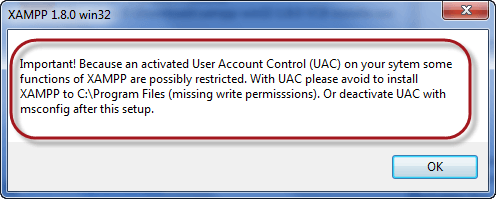
After you have downloaded XAMPP, run the setup. The warning message dialog window shown below appears.

Step 4) Change User Control Settings

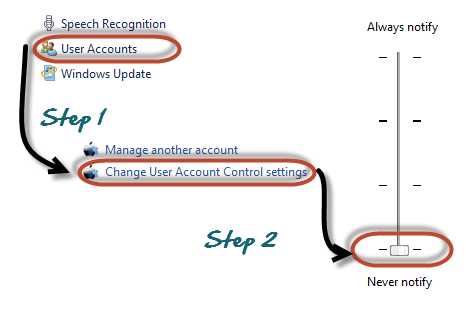
If you are using Windows Vista or Windows 7, make sure that you deactivate the User Account Control feature. To do this, Select Control Panel > User Accounts > Change User Access Control settings. The diagram below illustrates the main steps.

Step 5) Save the settings

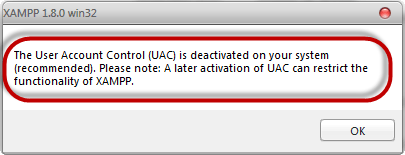
  • After you have deactivated the User Account Control, click on the OK button on the warning message box.
  • This time you get the following message

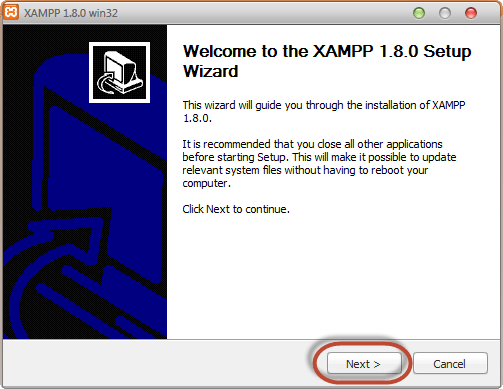
Step 6) Click Next

On the succeeding screen, click next

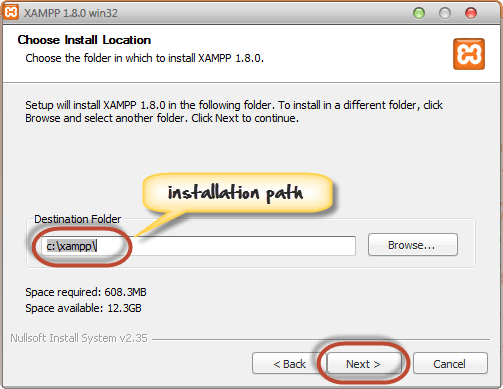
Step 7) Choose the Installation path

In the next screen, Change the installation path if required. Click Next

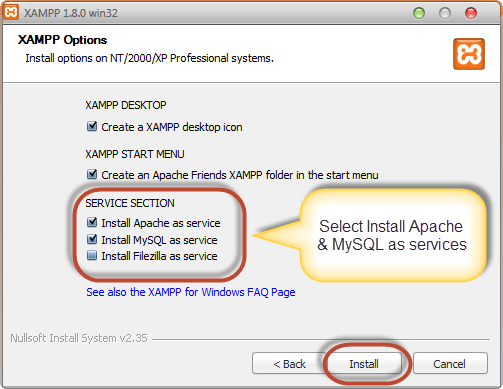
Step 8) Check the necessary services

On the next screen select Apache and MySQL. You may optionally select FileZilla (FTP Client) if needed. Click Install

Note a service is a long-running program in windows that does not require user intervention. Services can be set to run automatically whenever the windows operating system is started. For you to use Apache and MySQL, they are supposed to be running in the backgroundInstalling them as services run both Apache and MySQL automatically in the background whenever you power up your computer. If you have not installed Apache and MySQL as services, then you have to manually start them every time that you want to use them. You will have to do this from the XAMPP control panel.PHP and

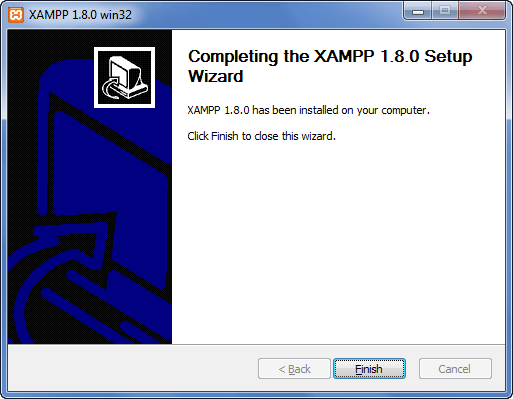
Step 9) Finish the installation

On successful completion of installation, you will see the following window

  • Click on the Finish button

Before we test our XAMPP installation, let’s first look at the basic directories that we will be working with.

Basic XAMPP Web Server Configuration

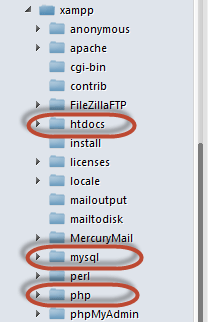
This XAMPP Tutorial assumes that you have installed XAMPP on drive C in Windows using the steps mentioned above. The following is a list of the basic directories that you are supposed to be aware of.

  • htdocs; this is the web root directory. All of our PHP codes will be placed in this directory.
  • mysql – this directory contains all the information related to the MySQL database engine, by default it runs on port 3306.
  • php – this directory contains PHP installation files. It contains an important file named php.ini. This directory is used to configure how PHP behaves on your server.

By default, the Apache web server runs on port 80. If port 80 is taken by another web server, you can use a different port number. For this tutorial, we will assume we are using port 80. Note, If you use SKYPE, it uses the same port. Close Skype if you want to use XAMPP for PHP on port 80

XAMPP Control Panel

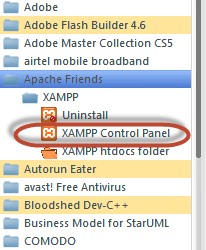
The control panel is used to manage programs installed via XAMPP. To open the XAMPP Server control panel,

  • Click on the start menu
  • Explore the program’s directory and locate Apace Friends and then XAMPP as shown in the diagram below

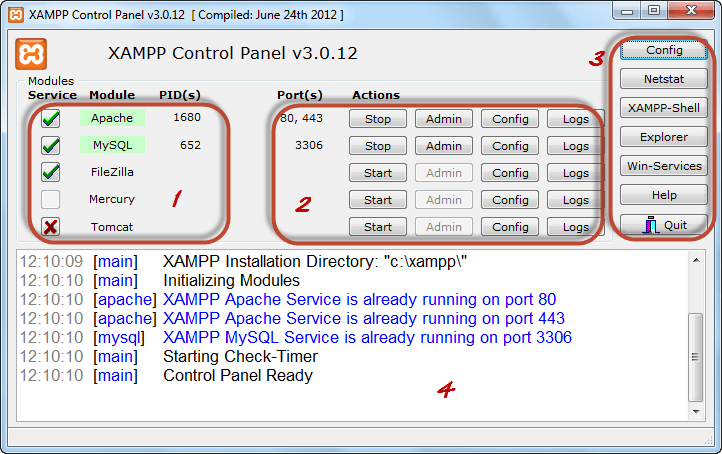
The diagram below shows the control panel.

1) This section lists the installed services, modules and the process IDs PID(s). A green tick means the module has been installed as a service. The red mark means it has not been installed as a service. To install a service, click on the red mark. If the button shows a green tick and you click on it, the control panel will ask you if you want to uninstall the system.

2) This section shows the Port(s) associated with the modules. The actions section is for;

  1. starting and stopping modules
  2. Open the administrative windows for Apache and MySQL
  3. Open configuration files for Apache, MySQL, etc. to make changes
  4. View log files for the modules

3) This section contains useful utilities such as Netsat, windows services shortcuts, etc.

4) This section displays status information on the modules. The control panel can be used to;

  • Install and uninstall services such as Apache, MySQL, etc. that are installed via XAMPP
  • Start and stop services.
  • Open configure files etc.

Configure XAMPP

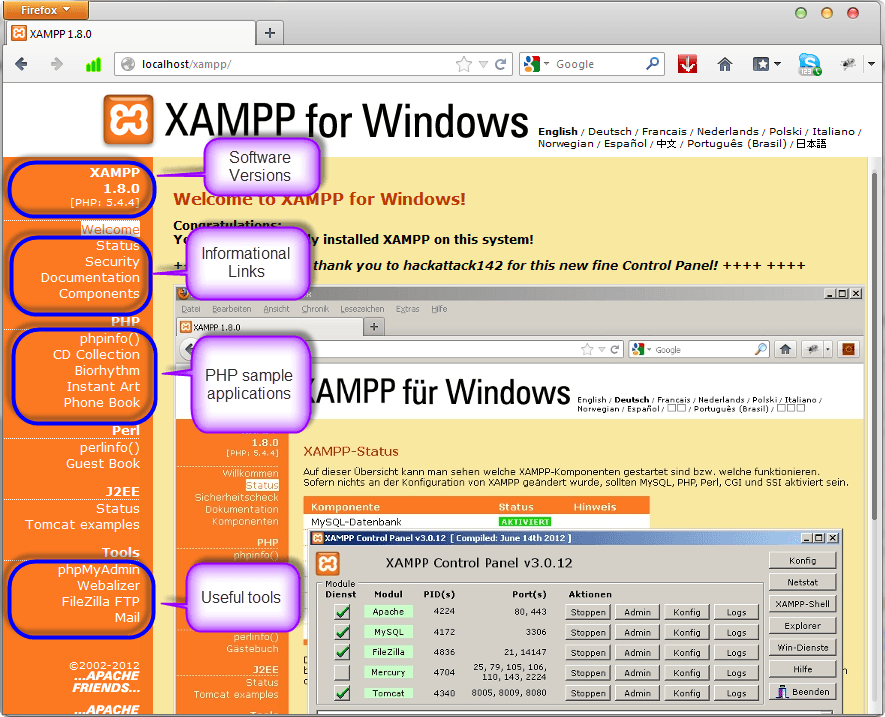
Let’s now look at the basic configurations required before we start using our XAMPP installation for developing PHP-powered websites. Type the URL http://localhost/xampp/ in your favorite browser. For this tutorial, we will be using Firefox as our web browser.

If you are able to see the above screen then you have installed XAMPP successfully. The panel on the left-hand side contains links to useful information such as;

  • The version of PHP installed
  • Security settings of XAMPP
  • Access to utilities such as phpMyAdmin etc.